> ## Documentation Index
> Fetch the complete documentation index at: https://docs.tryprofound.com/llms.txt
> Use this file to discover all available pages before exploring further.
# Agents
> Understand the Agent tools available through Profound MCP
Profound MCP gives AI assistants tools to build, manage, and run Profound Agents directly from an MCP client. To connect your MCP client to the hosted server, refer to the [Connection guides](/mcp/common-mcp-clients).
Learn more about Profound Agents in [Profound Help Center](https://help.tryprofound.com/articles/9762251986-agents-overview).
## How the tools work together
### Run an Agent
Ask which Agents exist. The assistant browses the organization's Agents with [`list_agents`](#list-agents), or pre-built templates with [`list_agent_definition_templates`](#list-agent-definition-templates).
Ask what an Agent needs to run. The assistant reads its `input_schema` with [`get_agent`](#get-agent) before starting a run.
Ask to run the Agent. The assistant starts the run with [`run_agent`](#run-agent), passing inputs that match the Agent's `input_schema`.
Ask whether the run is done. The assistant checks the run state with [`get_agent_run`](#get-agent-run).
### Build an Agent
Ask to build an Agent. The assistant opens a build session with [`start_agent_build_session`](#start-agent-build-session) and includes the returned `agent_build_session_id` in every later build call, so the whole build attempt is tracked as one session.
The assistant assembles a workflow graph with [`list_agent_node_types`](#list-agent-node-types) and [`get_agent_node_schema`](#get-agent-node-schema), or starts from a template with [`list_agent_definition_templates`](#list-agent-definition-templates).
When the graph includes a node that runs on a connected account, the assistant fills that node's `integration_id` with an ID from [`list_integrations`](#list-integrations).
The assistant previews the plan with [`create_agent_definition`](#create-agent-definition) or [`update_agent_definition`](#update-agent-definition), and saves the draft once you confirm.
The assistant catches issues in the Agent's structure early with [`validate_agent_definition`](#validate-agent-definition) and fixes them with `update_agent_definition`. This is a fast check before publishing the Agent.
Ask to make the Agent live. The assistant previews the publish plan with [`publish_agent_definition`](#publish-agent-definition) and applies it once you confirm.
#### Use natural language when working with Claude
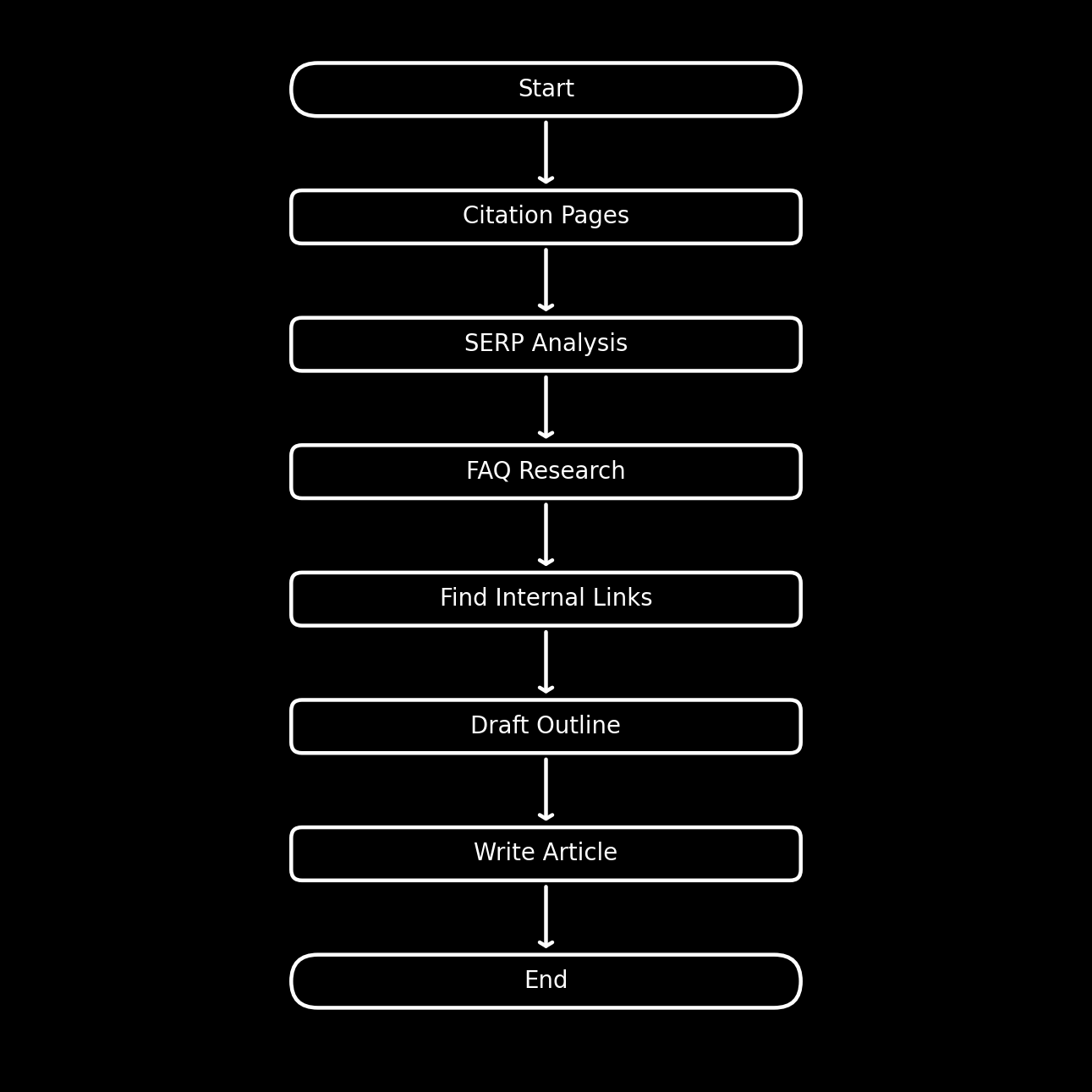
If you're using Claude as the client, you can prompt it in natural language to build Agents in one go, without making it step through various tools manually.
Here's an example prompt and an Agent structure Claude may produce with it:
```text wrap theme={null}
Build an Agent in Profound that creates a structured, AEO-optimized article based on provided inputs. It should analyze top-cited pages, live Google results, and existing brand content to produce a well-researched article
```
 ## Behavior and safety
Agents tools can create and update Agent definitions and start Agent runs. The create, update, and publish tools default to preview mode: the assistant receives a plan of the change first and applies it once you confirm.
| Behavior | What it means |
| - | - |
| Preview before apply | Create, update, and publish tools default to preview mode |
| Live data | Tools read from the Profound API, so results reflect the caller's current access and data |
## Agents tools
| Tool | Usage |
| - | - |
| `list_agents` | List Agents available in an organization |
| `get_agent` | Get details of a specific Agent, including its input schema |
| `run_agent` | Start an Agent run |
| `get_agent_run` | Check the status and output of a previously started run |
| `start_agent_build_session` | Open a build session to build or revise an Agent |
| `list_agent_node_types` | List the node types available for building an Agent graph |
| `get_agent_node_schema` | Get the configuration schema for a specific node type |
| `list_integrations` | List the integrations your organization has connected, to fill a node's `integration_id` |
| `list_agent_definition_templates` | Browse pre-built Agent templates to use as starting points |
| `get_agent_definition` | Read back an Agent's full workflow graph |
| `create_agent_definition` | Create a new draft Agent definition |
| `update_agent_definition` | Update an existing draft Agent definition |
| `validate_agent_definition` | Check whether a draft Agent definition is valid and publishable |
| `publish_agent_definition` | Publish a draft Agent definition so it goes live |
Lists the Agents defined in your organization.
**Example prompts**:
* "Which Agents do we have published?"
* "Show me our draft Agents."
**Inputs**
| Input | Required | Default | Description |
| - | - | - | - |
| `statuses` | No | `["published"]` | Agent statuses to include: `published`, `draft`, or both |
| `cursor` | No | - | Pagination cursor from a previous page |
| `limit` | No | - | Maximum number of Agents to return |
Gets details of a specific Agent, including its `input_schema`. The assistant reads this before calling `run_agent` to confirm which inputs the Agent expects.
**Example prompts**:
* "What inputs does the article writer Agent need?"
* "What does the weekly report Agent produce?"
**Inputs**
| Input | Required | Default | Description |
| - | - | - | - |
| `agent_id` | Yes | - | ID of the Agent to retrieve |
| `version` | No | `published` | `published` for the live version, `draft` for the latest unpublished changes |
Starts an Agent run. Returns a run ID the assistant can use in `get_agent_run`.
**Example prompts**:
* "Run the article writer Agent on the topic 'AI search trends'."
* "Kick off the weekly report Agent."
**Inputs**
| Input | Required | Default | Description |
| - | - | - | - |
| `agent_id` | Yes | - | ID of the Agent to run |
| `inputs` | Yes | - | Input values from the Agent's `input_schema` |
**Notes**:
* Each key in `inputs` is a property ID from the Agent's `input_schema`. The human-readable label for each property lives in that property's `title`.
Gets the status and outputs of a previously started Agent run. The assistant checks this repeatedly until the run ends, whether it succeeds or fails.
**Example prompts**:
* "Is that Agent run finished yet?"
* "What did the article writer Agent produce?"
**Inputs**
| Input | Required | Default | Description |
| - | - | - | - |
| `agent_id` | Yes | - | ID of the Agent the run belongs to |
| `run_id` | Yes | - | Run ID returned by `run_agent` |
| `verbose` | No | `false` | When `true`, include each step's raw output in the response |
Opens an Agent build session, the first step before building or revising an Agent. The assistant calls it before any other build tool, then includes the returned `agent_build_session_id` in every later build call.
**Example prompts**:
* "Build an Agent that drafts AEO-optimized articles from our citation data."
* "Let's rework the weekly report Agent."
**Inputs**
| Input | Required | Default | Description |
| - | - | - | - |
| `intent` | Yes | - | Short, plain-language description of what the Agent should do |
Lists the node types available for building an Agent. Returns each type's `node_type` identifier, display name, and a one-line description. The assistant calls this after opening a build session, when assembling a new Agent.
**Example prompts**:
* "What building blocks can the Agent use?"
* "Is there a node that runs a web search?"
**Inputs**
| Input | Required | Default | Description |
| - | - | - | - |
| `kind` | No | `null` | Narrow the list by which credential the node runs on: `third_party`, `platform_key`, or `native`. Omit for the full list |
**Notes**:
* `third_party` nodes run on an account your organization connects, such as WordPress or Slack. `platform_key` nodes run on an external research vendor Profound has an agreement with, such as Exa or Perplexity, so there's nothing for you to connect. `native` nodes are Profound's own: the structural nodes, such as `llm` and `code`, and the `profound_*` nodes that read your Profound data.
Gets the configuration schema and examples for a specific node type. The assistant uses the returned schema to fill a node's `config` correctly when building or editing an Agent.
**Example prompts**:
* "How is the LLM node configured?"
* "What settings does the code node take?"
**Inputs**
| Input | Required | Default | Description |
| - | - | - | - |
| `node_type` | Yes | - | Node type identifier from `list_agent_node_types` |
Lists the integrations your organization has connected and made available to Agents. Returns an `integration_id` for each connection, which the assistant uses for integration nodes before publishing the Agent.
**Example prompts**:
* "Which integrations can I use in my Agent?"
* "Is our WordPress connected, so the Agent can publish to it?"
**Inputs**
| Input | Required | Default | Description |
| - | - | - | - |
| `provider` | No | `null` | Filter results by an integration provider, such as `wordpress` or `google_gmail`. An empty result means no integrations from that provider are connected |
**Notes**:
* The tool returns only active connections.
* Each connection returns `integration_id`, `provider`, `account`, `label`, `status`, and `level`, which is `org` or `user`.
* If you have several connections from the same integration provider (for example, two different WordPress sites for a blog and for documentation), the `account` field tells the connections apart.
* Google Docs, Google Slides, and Google Sheets use the organization's Google Drive connection, so a returned `google_drive` connection covers nodes from all three. Gmail and Google Search Console each have a connection of their own.
Browses the public catalog of pre-built Agent templates. Each template includes a plain-language goal, the inputs it needs, what it produces, and a skeleton workflow to use as a starting point. The assistant calls this before building a new Agent from scratch.
**Example prompts**:
* "What Agent templates can we start from?"
* "Is there a template for a content refresh workflow?"
**Inputs:** none.
Reads an Agent's definition graph in the same format that `create_agent_definition` and `update_agent_definition` accept. The assistant uses this when copying an existing Agent or inspecting a node type you want to replicate.
**Example prompts**:
* "Show me how the article writer Agent is built."
* "Copy the weekly report Agent as a starting point for a new one."
**Inputs**
| Input | Required | Default | Description |
| - | - | - | - |
| `agent_id` | Yes | - | ID of the Agent to read |
| `version` | No | `published` | `published` for the live version, `draft` for the latest unpublished changes |
Creates a new draft Agent definition. The preview returns a plain-language plan and workflow diagram without saving anything, and the assistant saves the draft once you confirm.
**Example prompts**:
* "Save that workflow as a draft Agent."
* "Create the Agent we just designed."
**Inputs**
| Input | Required | Default | Description |
| - | - | - | - |
| `name` | Yes | - | Display name for the Agent |
| `description` | Yes | - | What the Agent does |
| `organization_id` | Yes | - | Organization to create the Agent in, from `list_organizations` |
| `graph` | Yes | - | The workflow graph as a `{ nodes, edges }` object |
| `agent_build_session_id` | Yes | - | Session ID from `start_agent_build_session` |
| `preview` | No | `true` | When `true`, return a plan without saving; when `false`, save the draft |
Updates an existing draft Agent definition. The assistant uses this tool to fix validation issues after `create_agent_definition` or to iterate on a saved draft. Displays the preview first and applies it after you confirm.
**Example prompts**:
* "Fix the validation issues and update the draft."
* "Add a web search step to the draft Agent."
**Inputs**
| Input | Required | Default | Description |
| - | - | - | - |
| `agent_id` | Yes | - | ID of the draft Agent to update |
| `graph` | Yes | - | The updated definition graph |
| `agent_build_session_id` | Yes | - | Session ID from `start_agent_build_session` |
| `preview` | No | `true` | When `true`, return a plan without saving; when `false`, save |
Checks whether a saved draft Agent definition is valid. Returns `valid` (boolean), `issues` (list of actionable errors), and, when the draft is publishable, the `input_schema` and `output_schema` the Agent exposes once live.
**Example prompts**:
* "Check whether the draft Agent is publishable."
* "Anything wrong with the Agent before we publish it?"
**Inputs**
| Input | Required | Default | Description |
| - | - | - | - |
| `agent_id` | Yes | - | ID of the draft Agent to validate |
| `agent_build_session_id` | Yes | - | Session ID from `start_agent_build_session` |
**Notes:**
* A draft Agent can't be run, so this is the only check available before you publish.
* The check covers the Agent's structure only, so a draft that passes it can still be rejected when you publish. Publishing applies the stricter check.
* The check also reports a required field that's set but unusable, such as an empty `integration_id` on a node that runs on a connected account, or a missing `data.category_id` on a node that reads Profound data. Publishing allows both, so an Agent published with either one unresolved fails when it runs.
* If the check reveals any issues, the assistant fixes them with `update_agent_definition`.
Publishes an Agent definition so it goes live and is visible across the organization. Displays the preview first and applies it after you confirm.
**Example prompts**:
* "Publish the Agent so the team can use it."
* "Make the article writer Agent live."
**Inputs**
| Input | Required | Default | Description |
| - | - | - | - |
| `agent_id` | Yes | - | ID of the draft Agent to publish |
| `agent_build_session_id` | Yes | - | Session ID from `start_agent_build_session` |
| `preview` | No | `true` | When `true`, return a plan without publishing; when `false`, publish |
**Notes**:
* Publishing checks the Agent's structure and output wiring before anything changes, so a draft with structural problems is rejected and stays a draft. This check is stricter than the one `validate_agent_definition` runs.
* Publishing doesn't check what the Agent needs in order to run. An Agent missing a node's `integration_id` or `data.category_id` publishes and then fails when it runs, so resolve both before you publish.
## Resources
Profound MCP provides reference material for Agents as read-only MCP resources.
| Resource URI | Description |
| - | - |
| `file:///profound/agent-builder-guide` | The Agent-building playbook, from intake and building through preview, validation, publishing, and running |
| `file:///profound/glossary/agent` | The definition of a Profound Agent |
| `file:///profound/glossary/agent-run` | The definition of an Agent run |
## Behavior and safety
Agents tools can create and update Agent definitions and start Agent runs. The create, update, and publish tools default to preview mode: the assistant receives a plan of the change first and applies it once you confirm.
| Behavior | What it means |
| - | - |
| Preview before apply | Create, update, and publish tools default to preview mode |
| Live data | Tools read from the Profound API, so results reflect the caller's current access and data |
## Agents tools
| Tool | Usage |
| - | - |
| `list_agents` | List Agents available in an organization |
| `get_agent` | Get details of a specific Agent, including its input schema |
| `run_agent` | Start an Agent run |
| `get_agent_run` | Check the status and output of a previously started run |
| `start_agent_build_session` | Open a build session to build or revise an Agent |
| `list_agent_node_types` | List the node types available for building an Agent graph |
| `get_agent_node_schema` | Get the configuration schema for a specific node type |
| `list_integrations` | List the integrations your organization has connected, to fill a node's `integration_id` |
| `list_agent_definition_templates` | Browse pre-built Agent templates to use as starting points |
| `get_agent_definition` | Read back an Agent's full workflow graph |
| `create_agent_definition` | Create a new draft Agent definition |
| `update_agent_definition` | Update an existing draft Agent definition |
| `validate_agent_definition` | Check whether a draft Agent definition is valid and publishable |
| `publish_agent_definition` | Publish a draft Agent definition so it goes live |
Lists the Agents defined in your organization.
**Example prompts**:
* "Which Agents do we have published?"
* "Show me our draft Agents."
**Inputs**
| Input | Required | Default | Description |
| - | - | - | - |
| `statuses` | No | `["published"]` | Agent statuses to include: `published`, `draft`, or both |
| `cursor` | No | - | Pagination cursor from a previous page |
| `limit` | No | - | Maximum number of Agents to return |
Gets details of a specific Agent, including its `input_schema`. The assistant reads this before calling `run_agent` to confirm which inputs the Agent expects.
**Example prompts**:
* "What inputs does the article writer Agent need?"
* "What does the weekly report Agent produce?"
**Inputs**
| Input | Required | Default | Description |
| - | - | - | - |
| `agent_id` | Yes | - | ID of the Agent to retrieve |
| `version` | No | `published` | `published` for the live version, `draft` for the latest unpublished changes |
Starts an Agent run. Returns a run ID the assistant can use in `get_agent_run`.
**Example prompts**:
* "Run the article writer Agent on the topic 'AI search trends'."
* "Kick off the weekly report Agent."
**Inputs**
| Input | Required | Default | Description |
| - | - | - | - |
| `agent_id` | Yes | - | ID of the Agent to run |
| `inputs` | Yes | - | Input values from the Agent's `input_schema` |
**Notes**:
* Each key in `inputs` is a property ID from the Agent's `input_schema`. The human-readable label for each property lives in that property's `title`.
Gets the status and outputs of a previously started Agent run. The assistant checks this repeatedly until the run ends, whether it succeeds or fails.
**Example prompts**:
* "Is that Agent run finished yet?"
* "What did the article writer Agent produce?"
**Inputs**
| Input | Required | Default | Description |
| - | - | - | - |
| `agent_id` | Yes | - | ID of the Agent the run belongs to |
| `run_id` | Yes | - | Run ID returned by `run_agent` |
| `verbose` | No | `false` | When `true`, include each step's raw output in the response |
Opens an Agent build session, the first step before building or revising an Agent. The assistant calls it before any other build tool, then includes the returned `agent_build_session_id` in every later build call.
**Example prompts**:
* "Build an Agent that drafts AEO-optimized articles from our citation data."
* "Let's rework the weekly report Agent."
**Inputs**
| Input | Required | Default | Description |
| - | - | - | - |
| `intent` | Yes | - | Short, plain-language description of what the Agent should do |
Lists the node types available for building an Agent. Returns each type's `node_type` identifier, display name, and a one-line description. The assistant calls this after opening a build session, when assembling a new Agent.
**Example prompts**:
* "What building blocks can the Agent use?"
* "Is there a node that runs a web search?"
**Inputs**
| Input | Required | Default | Description |
| - | - | - | - |
| `kind` | No | `null` | Narrow the list by which credential the node runs on: `third_party`, `platform_key`, or `native`. Omit for the full list |
**Notes**:
* `third_party` nodes run on an account your organization connects, such as WordPress or Slack. `platform_key` nodes run on an external research vendor Profound has an agreement with, such as Exa or Perplexity, so there's nothing for you to connect. `native` nodes are Profound's own: the structural nodes, such as `llm` and `code`, and the `profound_*` nodes that read your Profound data.
Gets the configuration schema and examples for a specific node type. The assistant uses the returned schema to fill a node's `config` correctly when building or editing an Agent.
**Example prompts**:
* "How is the LLM node configured?"
* "What settings does the code node take?"
**Inputs**
| Input | Required | Default | Description |
| - | - | - | - |
| `node_type` | Yes | - | Node type identifier from `list_agent_node_types` |
Lists the integrations your organization has connected and made available to Agents. Returns an `integration_id` for each connection, which the assistant uses for integration nodes before publishing the Agent.
**Example prompts**:
* "Which integrations can I use in my Agent?"
* "Is our WordPress connected, so the Agent can publish to it?"
**Inputs**
| Input | Required | Default | Description |
| - | - | - | - |
| `provider` | No | `null` | Filter results by an integration provider, such as `wordpress` or `google_gmail`. An empty result means no integrations from that provider are connected |
**Notes**:
* The tool returns only active connections.
* Each connection returns `integration_id`, `provider`, `account`, `label`, `status`, and `level`, which is `org` or `user`.
* If you have several connections from the same integration provider (for example, two different WordPress sites for a blog and for documentation), the `account` field tells the connections apart.
* Google Docs, Google Slides, and Google Sheets use the organization's Google Drive connection, so a returned `google_drive` connection covers nodes from all three. Gmail and Google Search Console each have a connection of their own.
Browses the public catalog of pre-built Agent templates. Each template includes a plain-language goal, the inputs it needs, what it produces, and a skeleton workflow to use as a starting point. The assistant calls this before building a new Agent from scratch.
**Example prompts**:
* "What Agent templates can we start from?"
* "Is there a template for a content refresh workflow?"
**Inputs:** none.
Reads an Agent's definition graph in the same format that `create_agent_definition` and `update_agent_definition` accept. The assistant uses this when copying an existing Agent or inspecting a node type you want to replicate.
**Example prompts**:
* "Show me how the article writer Agent is built."
* "Copy the weekly report Agent as a starting point for a new one."
**Inputs**
| Input | Required | Default | Description |
| - | - | - | - |
| `agent_id` | Yes | - | ID of the Agent to read |
| `version` | No | `published` | `published` for the live version, `draft` for the latest unpublished changes |
Creates a new draft Agent definition. The preview returns a plain-language plan and workflow diagram without saving anything, and the assistant saves the draft once you confirm.
**Example prompts**:
* "Save that workflow as a draft Agent."
* "Create the Agent we just designed."
**Inputs**
| Input | Required | Default | Description |
| - | - | - | - |
| `name` | Yes | - | Display name for the Agent |
| `description` | Yes | - | What the Agent does |
| `organization_id` | Yes | - | Organization to create the Agent in, from `list_organizations` |
| `graph` | Yes | - | The workflow graph as a `{ nodes, edges }` object |
| `agent_build_session_id` | Yes | - | Session ID from `start_agent_build_session` |
| `preview` | No | `true` | When `true`, return a plan without saving; when `false`, save the draft |
Updates an existing draft Agent definition. The assistant uses this tool to fix validation issues after `create_agent_definition` or to iterate on a saved draft. Displays the preview first and applies it after you confirm.
**Example prompts**:
* "Fix the validation issues and update the draft."
* "Add a web search step to the draft Agent."
**Inputs**
| Input | Required | Default | Description |
| - | - | - | - |
| `agent_id` | Yes | - | ID of the draft Agent to update |
| `graph` | Yes | - | The updated definition graph |
| `agent_build_session_id` | Yes | - | Session ID from `start_agent_build_session` |
| `preview` | No | `true` | When `true`, return a plan without saving; when `false`, save |
Checks whether a saved draft Agent definition is valid. Returns `valid` (boolean), `issues` (list of actionable errors), and, when the draft is publishable, the `input_schema` and `output_schema` the Agent exposes once live.
**Example prompts**:
* "Check whether the draft Agent is publishable."
* "Anything wrong with the Agent before we publish it?"
**Inputs**
| Input | Required | Default | Description |
| - | - | - | - |
| `agent_id` | Yes | - | ID of the draft Agent to validate |
| `agent_build_session_id` | Yes | - | Session ID from `start_agent_build_session` |
**Notes:**
* A draft Agent can't be run, so this is the only check available before you publish.
* The check covers the Agent's structure only, so a draft that passes it can still be rejected when you publish. Publishing applies the stricter check.
* The check also reports a required field that's set but unusable, such as an empty `integration_id` on a node that runs on a connected account, or a missing `data.category_id` on a node that reads Profound data. Publishing allows both, so an Agent published with either one unresolved fails when it runs.
* If the check reveals any issues, the assistant fixes them with `update_agent_definition`.
Publishes an Agent definition so it goes live and is visible across the organization. Displays the preview first and applies it after you confirm.
**Example prompts**:
* "Publish the Agent so the team can use it."
* "Make the article writer Agent live."
**Inputs**
| Input | Required | Default | Description |
| - | - | - | - |
| `agent_id` | Yes | - | ID of the draft Agent to publish |
| `agent_build_session_id` | Yes | - | Session ID from `start_agent_build_session` |
| `preview` | No | `true` | When `true`, return a plan without publishing; when `false`, publish |
**Notes**:
* Publishing checks the Agent's structure and output wiring before anything changes, so a draft with structural problems is rejected and stays a draft. This check is stricter than the one `validate_agent_definition` runs.
* Publishing doesn't check what the Agent needs in order to run. An Agent missing a node's `integration_id` or `data.category_id` publishes and then fails when it runs, so resolve both before you publish.
## Resources
Profound MCP provides reference material for Agents as read-only MCP resources.
| Resource URI | Description |
| - | - |
| `file:///profound/agent-builder-guide` | The Agent-building playbook, from intake and building through preview, validation, publishing, and running |
| `file:///profound/glossary/agent` | The definition of a Profound Agent |
| `file:///profound/glossary/agent-run` | The definition of an Agent run |